> For the complete documentation index, see [llms.txt](https://docs.migration-center.com/llms.txt). Markdown versions of documentation pages are available by appending `.md` to page URLs; this page is available as [Markdown](https://docs.migration-center.com/25.1/installation-guide/system-architecture.md).
# System Architecture
## Component Overview
Migration-center has 3 main components: **Database** component, **WebClient** and **Jobserver** component.
The **Database** stores all the migration-center configurations and all scanned and imported objects with their source and target metadata.
The **WebClient** is a web based UI where you can manage all the scanner, importer and migset configurations and you can trigger scan, import or transformation jobs. The WebClient can be installed on a machine in your network and then accessed from multiple other machines through a web browser (see [System Requirements](/25.1/installation-guide/system-requirements.md#webclient) for supported browsers).
The **Jobserver** component receives the scan or import configuration from the Client and connects to source/target systems to extract/import objects, processes metadata into/from the Database and the content into/from the file system staging area. Multiple Jobservers can be installed.
## Component Diagrams
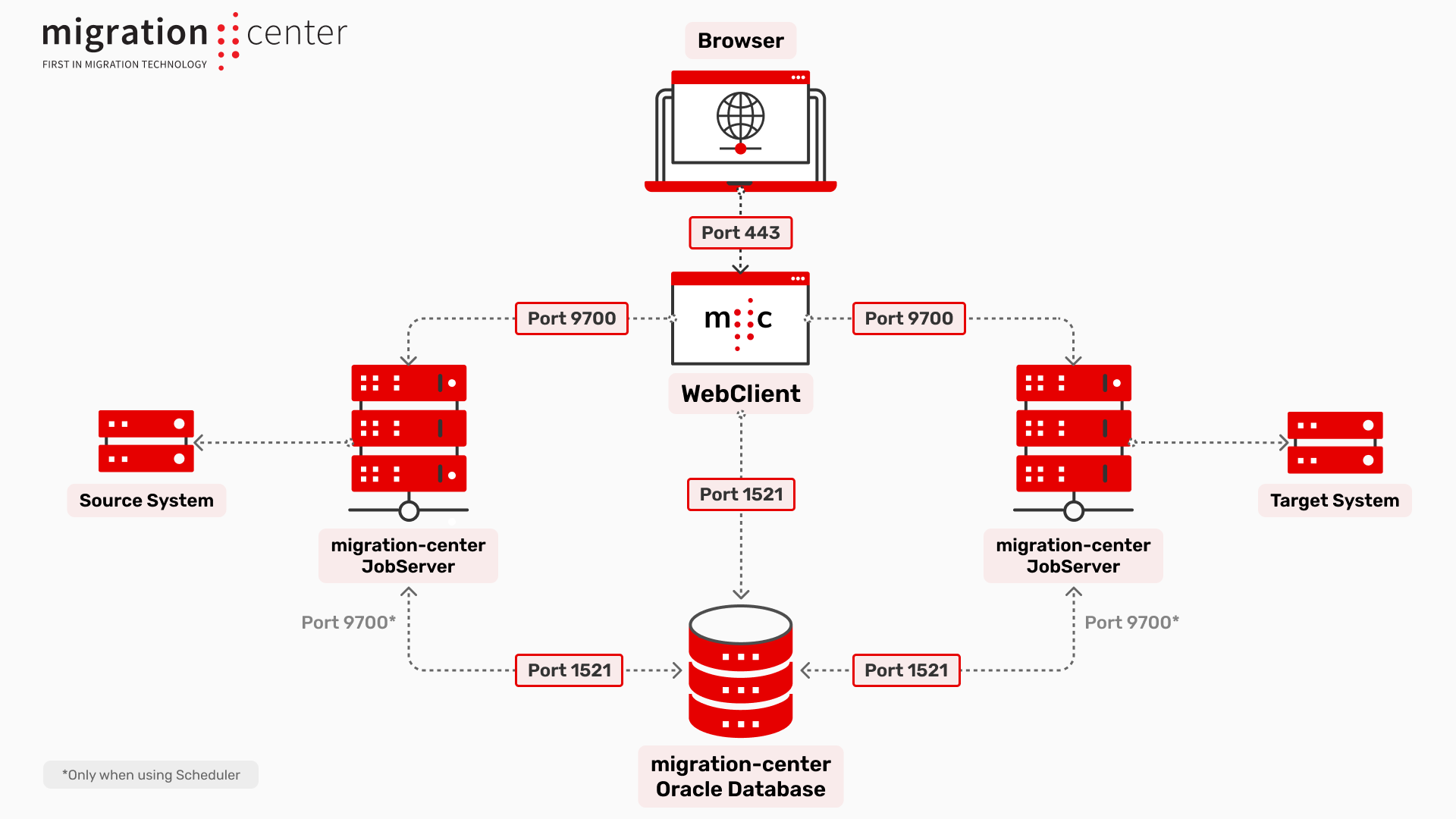
### Oracle
Port connections for an Oracle database
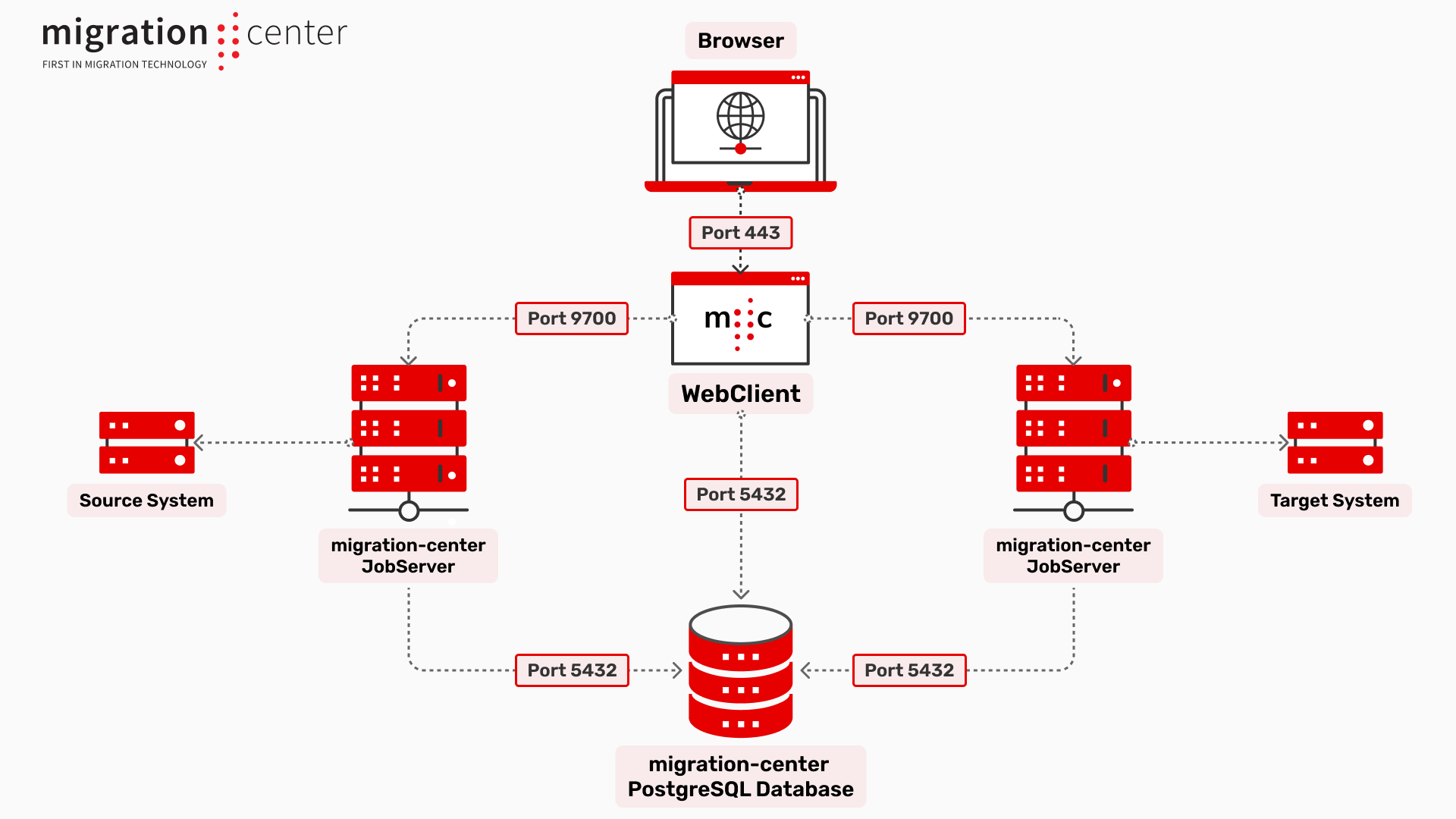
### Postgres
Port connections for a PostgreSQL database
## Component Port Connections
The **WebClient** connects as follows:
\- to the Browser via port 443\
\- to the Database using connection via information provided by the user (default: 1521 for Oracle, 5432 for Postgres)\
\- to the Jobserver via port 9700 by default
The **Jobserver** connects as follows:\
\- to the Database via JDBC connection on the same Oracle/Postgres port as the Client\
\- to each source or target system differently based on the system itself
When using the **Scheduler** feature on an **Oracle database** the job will be triggered by the Database instance itself, from the Database machine, by sending a socket signal to the Jobserver via the defined port (9700 by default).
{% hint style="warning" %}
For the following systems there are additional steps or components: Alfresco, Documentum, Domino/Lotus Notes, SharePoint, SharePoint Online.
Please refer to their respective user guides for the actual instructions.
{% endhint %}
---
# Agent Instructions
This documentation is published with GitBook. GitBook is the documentation platform designed so that both humans and AI agents can read, navigate, and reason over technical content effectively. Learn more at gitbook.com.
## Querying This Documentation
If you need additional information that is not directly available in this page, you can query the documentation by asking a question.
Perform an HTTP GET request on the following URL with the `ask` and `goal` query parameters:
```
GET https://docs.migration-center.com/25.1/installation-guide/system-architecture.md?ask=&goal=
```
`ask` is the immediate question: it should be specific, self-contained, and written in natural language.
`goal` is what the user is ultimately trying to achieve, the reason they need the answer. Sharing it helps GitBook give you a better, more relevant answer. A goal is most helpful when it describes the outcome the user wants rather than restating the question. For example, with `ask=how do I create an API token`, a goal like `automate deployments from our CI pipeline` lets GitBook tailor the answer to that use case.
The response will contain a direct answer to the question and relevant excerpts and sources from the documentation.
Use this mechanism when the answer is not explicitly present in the current page, you need clarification or additional context, or you want to retrieve related documentation sections.